Italic vs Cursive Text: A Field Guide
Unicode italic and cursive come from different code blocks. See where each renders, when native markdown beats Unicode, and how to stay searchable.
The One Distinction Every “Fancy Font” Tool Skips
Type a word into almost any fancy text generator and you’ll get two slanted results sitting next to each other: one labeled italic, one labeled cursive (sometimes “script”). They look like cousins. They are not the same character set, and confusing them is the single most common reason a bio renders perfectly on your phone and turns into empty boxes on someone else’s.
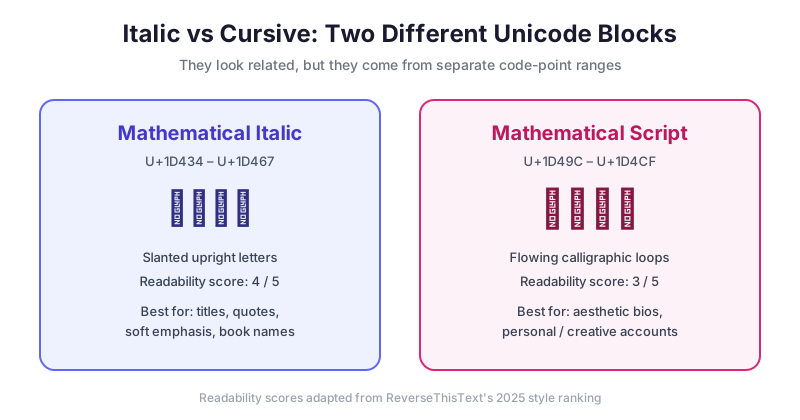
Here is the split that matters. Unicode italic — the 𝑚𝑎𝑟𝑘 𝑑𝑎𝑖𝑙𝑦 style — comes from the Mathematical Italic block, code points U+1D434 through U+1D467, with the lowercase h handled by the legacy U+210E character. Cursive comes from the Mathematical Script block, U+1D49C through U+1D4CF plus a few legacy letterlike-symbol exceptions, and renders as 𝓂𝒶𝓇𝓀 𝒹𝒶𝒾𝓁𝓎. Two different ranges, two different rendering paths, two different fallback behaviors on older devices. If you only remember one thing from this guide, remember that “italic” and “cursive” are not styling instructions applied to a font — they are separate blocks of standalone characters, and each carries its own compatibility profile.
That single fact drives every practical decision below: where each style survives a paste, how much of your character limit it eats, and whether a recruiter’s search will ever find your name again.
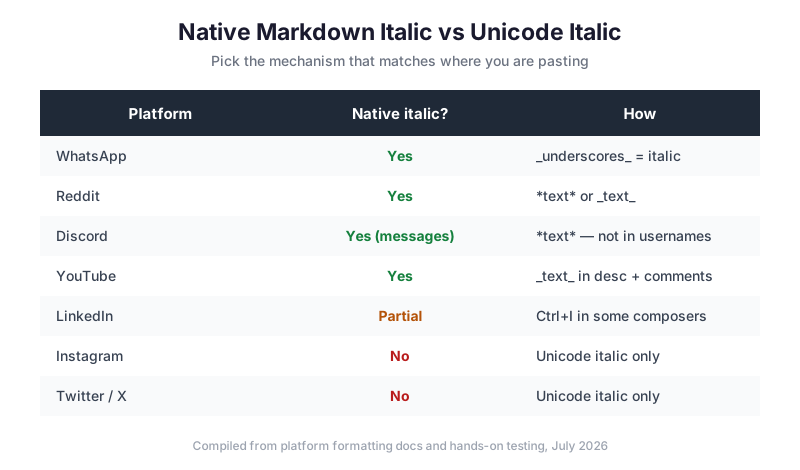
Native Markdown Italic vs Unicode Italic
Most tool pages push Unicode as the only way to italicize on social platforms. That is only half true, and following it blindly wastes characters and hurts your searchability. Several platforms have native italic — real formatting that keeps your text as normal, searchable letters. You should reach for Unicode only when native formatting doesn’t exist.
The two mechanisms are fundamentally different. Native italic (WhatsApp’s _underscores_, Reddit’s *asterisks*, LinkedIn’s Ctrl+I) leaves the underlying characters as standard ASCII — “Hello” stays “Hello” to search engines and screen readers, and the platform simply slants the display. Unicode italic replaces every letter with a different code point, so “Hello” becomes five characters no search box will ever match against “Hello.”
The rule of thumb: if a platform offers native italic, use it. You keep your text searchable, accessible, and cheap on characters. Save Unicode italic for the places with no native option — Instagram bios and captions, Twitter/X posts, TikTok bios — where a styled code point is genuinely the only route to a slanted look.
Step-by-Step: Getting Italic or Cursive Where You Need It
- Decide which platform you’re pasting into. This determines whether you even need Unicode. Instagram and Twitter/X have no native italic; WhatsApp, Reddit, Discord messages, and YouTube descriptions do.
- If native exists, use the shortcut. On Reddit type
*your text*; on WhatsApp type_your text_; on YouTube wrap a word in_underscores_inside the description or a comment. No generator required. - If native doesn’t exist, generate the Unicode version. Open the Bold Text Generator, type your phrase, and copy the italic or script output.
- Test in a neutral field first. Paste into a notes app or a private draft. Empty boxes here mean the destination device lacks the glyphs — switch to a simpler style before publishing.
- Keep your searchable identifiers plain. Your @handle, your legal name in a LinkedIn headline, and any keyword you want indexed should stay in normal characters. Style the decorative parts only.
Comparison: Italic, Cursive, and Native Emphasis
Each approach trades readability, reach, and searchability differently. Use this to choose before you paste.
| Factor | Unicode Italic (𝑚𝑎𝑟𝑘) | Unicode Cursive (𝓂𝒶𝓇𝓀) | Native Markdown Italic |
|---|---|---|---|
| Unicode block | Math Italic (U+1D434–1D467, with h at U+210E) | Math Script (U+1D49C–1D4CF plus legacy exceptions) | None — stays ASCII |
| Readability (1–5) | 4 | 3 | 5 |
| Stays searchable | No | No | Yes |
| Screen-reader friendly | No | No | Yes |
| Character-limit cost | ~2 units per letter | ~2 units per letter | 1:1 |
| Works on Instagram bio | Yes | Yes | N/A (no native) |
| Works in Reddit search | No | No | Yes |
| Best use | Titles, quotes, soft emphasis | Aesthetic bios, creative brands | Chat emphasis, professional posts |
The character-limit column is the one people learn the hard way. Because italic and cursive letters live outside the Basic Multilingual Plane’s ASCII range, apps that count UTF-16 code units — Instagram among them — often register each styled letter as two characters. On a 150-character Instagram bio, a fully cursive line can eat its budget twice as fast as plain text. Twitter’s 280-character counter behaves similarly for these blocks.
Common Mistakes to Avoid
Styling your name into invisibility. If your Instagram display name or LinkedIn headline is 𝒸𝓊𝓇𝓈𝒾𝓋ℯ, the platform’s search cannot match it to your real name. People looking for you won’t find you. Keep the searchable field plain and decorate elsewhere.
Double-formatting on Reddit and Discord. Wrapping Unicode italic inside native markdown (*𝘵𝘦𝘹𝘵*) produces a mess — the markdown engine tries to italicize characters that are already visually italic. Choose one mechanism per phrase, never both.
Assuming cursive works everywhere italic does. Because they’re separate blocks, a device can have the italic glyphs but not the script ones. Script/cursive fails more often on older Android builds and some email clients. When in doubt, italic is the safer of the two.
Writing whole paragraphs in styled text. Beyond a short line, both styles slow reading and, more seriously, become unreadable to screen readers, which announce each code point literally — “mathematical script small h, mathematical script small e.” Our companion piece on Unicode text accessibility covers this tradeoff in depth.
Ignoring the platform-strip rule. Some fields silently drop non-ASCII characters on submit. Post titles on large subreddits and certain username fields are common offenders. If styled text vanishes after you hit save, the field stripped it — see our platform compatibility chart for where this happens.
Expert Tips
For a live walkthrough of generating copy-paste script and italic styles, MateTools published a short demo of a fancy font generator that shows the copy-to-clipboard flow end to end:
The clip (MateTools, Fancy Font Generator — copy and paste for free) demonstrates the mechanical part well: type, pick a style, copy, paste. Our editorial take is that the demo understates one thing worth flagging — it treats every style as interchangeable, when in practice the italic and script outputs behave differently on the destination platform, exactly as the compatibility table above shows. Watch it for the workflow, then apply the platform judgment from this guide.
A few field-tested habits from building and maintaining text tools:
Use italic for typographic convention, not just decoration. Book titles, film names, and foreign phrases are supposed to be italic in formal writing. On a platform with no native italic, Unicode italic lets you follow that convention — a genuinely useful, non-decorative reason to reach for it.
Match style to platform culture. Cursive reads as elegant on Instagram and Tumblr but “out of place” in Discord and technical subreddits, per community-behavior rankings. Italic is the more neutral, widely-accepted choice across professional and casual contexts alike.
Preview on the actual target, not just your phone. A line that looks flawless in iOS can collapse on Discord mobile or a colleague’s older device. The Mathematical Alphanumeric Symbols block is widely but not universally supported.
FAQ
Is cursive text the same as italic text?
No. Italic text uses the Mathematical Italic Unicode block (U+1D434–U+1D467) and looks like slanted upright letters. Cursive — often labeled “script” — uses the Mathematical Script block (U+1D49C–U+1D4CF) and has flowing, looped, calligraphic letterforms. They are separate character sets with separate compatibility, not two settings of one font.
Why does my italic or cursive text show up as empty boxes?
Empty boxes (tofu) mean the viewer’s device or app lacks the glyphs for that specific Unicode block. Cursive/script fails more often than italic because it’s less widely supported, especially on older Android versions and some email clients. Switch to the italic block or plain text for guaranteed rendering.
Will italic Unicode text hurt my searchability?
Yes. Unicode italic and cursive replace standard letters with different code points, so search boxes and search engines can’t match them to the normal spelling. Keep names, handles, and keywords you want found in plain text, and use styled characters only for decorative or emphasis text.
Should I use native italic or Unicode italic?
Use native italic wherever it exists — WhatsApp (_text_), Reddit (*text*), Discord messages (*text*), YouTube descriptions and comments (_text_), and LinkedIn (Ctrl+I in supported composers). Native italic keeps your text searchable, accessible, and 1:1 on character count. Use Unicode italic only where there’s no native option, such as Instagram and Twitter/X.
Does italic text count as more characters?
Often, yes. Because italic and cursive letters sit outside the ASCII range, platforms that count UTF-16 units — including Instagram — frequently count each styled letter as two characters. A cursive line can therefore use up a 150-character bio limit roughly twice as fast as plain text. Test near a limit before publishing.
Can screen readers read italic and cursive Unicode text?
Poorly. Screen readers announce each code point literally, so cursive “Hello” may be read as “mathematical script small h, mathematical script small e,” and so on. For accessibility, reserve styled text for short accents and keep essential information in plain characters.
Ready to generate italic, cursive, and five other styles instantly? Open the Bold Text Generator — free, no signup, copy-and-paste ready.
Try Bold Text Generator Now
Convert your text to bold, italic, and 5 other styles — free, no signup.
Open Generator